

Even when I had a Fisheye lens on my camera, I could not help myself to take a photo of the Germany pavilion in Epcot’s World Showcase. Germany is so different then all the other countries with a wide open and welcoming courtyard with the statue of St. George on his horse in the center.
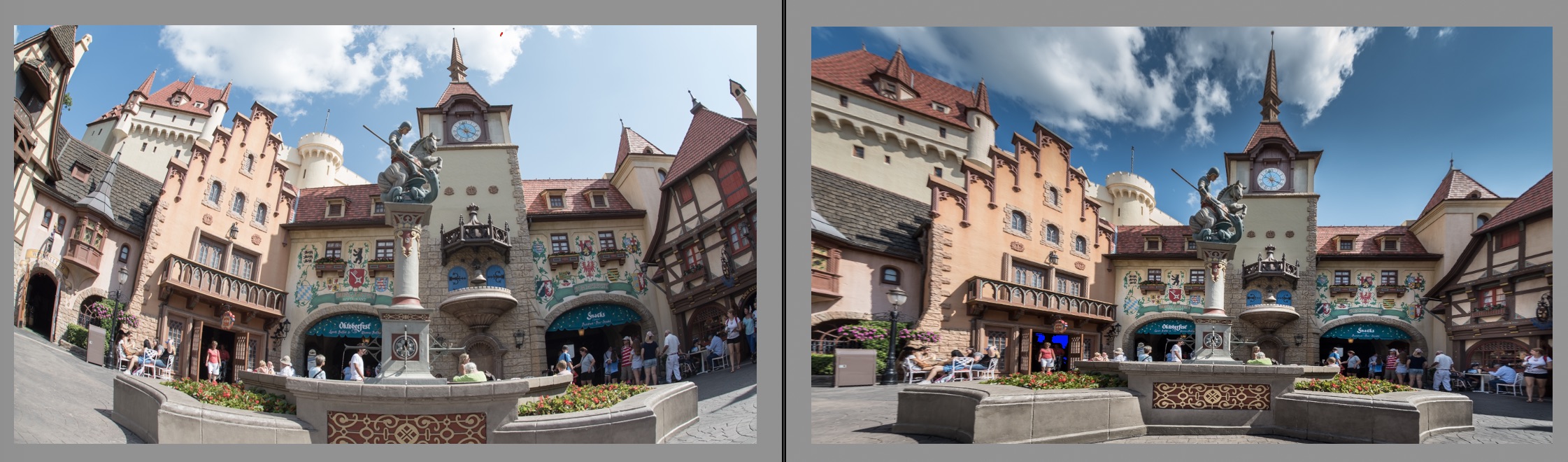
I do not want to go over how I “normalized” the Fisheye distortion here. If you are interested, visit this post from a few months ago: Adjusting Disney Fisheye Photos. I followed the same work flow detailed there.
I did do several more edits as I have been using my time to dig into more ways to improve my photos through editing using Adobe’s Lightroom Classic (desktop version).
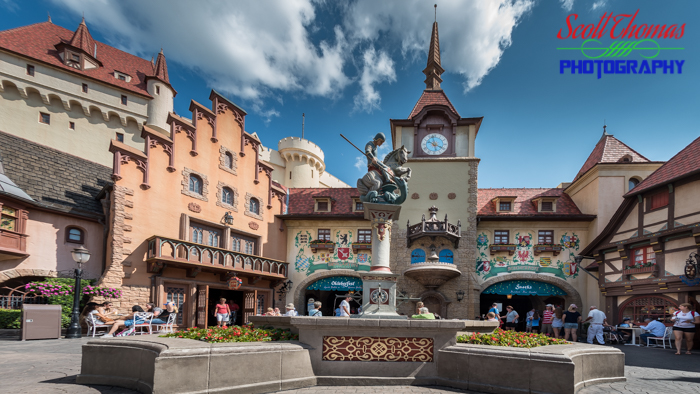
In the final image, I used a Graduated filter for the sky to bring down the exposure to bring out more detail in the clouds and color in the sky. I added several Radial filters to lighten out areas around the courtyard buildings. Here are the locations: Clock face, both entrances to the restaurant and the people and building on the far right. The left side I left alone as it was in sunlight. I brushed a little added exposure on the St. George statue and the red and gold tapestry painted on the statue’s base.
Do you like it? Have a criticism? Leave me a Comment, please.
Be sure to follow @allearsnet on Facebook, Instagram and Twitter!
Click below to subscribe to the AllEars® newsletter so you don’t miss any of the latest Disney news!







Is it possible to take pictures which have all these details without using photo editing software? I realize the editing software can help improve the quality of the pictures for someone like me who just doesn’t always understand which aperture and shutter speed to use in that exact moment and by the time I think about it, the picture has changed.