


A couple of months ago I started using Apple’s Aperture 2 photo application. The photo editor in Aperture is much better than anything I’ve ever used. While not a true graphics editor like Photoshop, Aperture does have some tools which are helping me make great photographs from not-so-great ones.
Like this photo of a performer in Disney’s Animal Kingdom’s Festival of the Lion King show. I caught her just before she was about to blow a kiss to the audience at the end of the show. I really loved this photo except for the object on the right hand side. I believe it’s a hand or part of a costume from another performer passing out of the frame.

Festival of the Lion King Goodbye Kiss before cloning.
Nikon D70/18-200VR, 1/60s, f/5.6, 1600 ISO, -0.3 EV, 200mm Focal Length
I could crop the object out but, with such a high ISO, the image would get even grainer than it already is. Aperture, like other photo editors, has a clone repair tool. What a clone repair tool does is allow you to take a part of a photo and then “paint” over another area duplicating that part. You do this with a “brush”. In Aperture’s case, it’s a circle.
To go about fixing this photo, I selected the cloning tool and adjusted it’s size. The area just above the object is what I used to clone. I moved the brush there and clicked the mouse to select it. Then, I moved my mouse with the left button held down over the area and carefully replaced the object with the selected area. Below is the final result after a few tries. Many editors let you start over if you don’t like the initial results. If your photo editor doesn’t, be sure to save a backup before starting. To see if your photo editor is capable of cloning, look through it’s manual or support website.
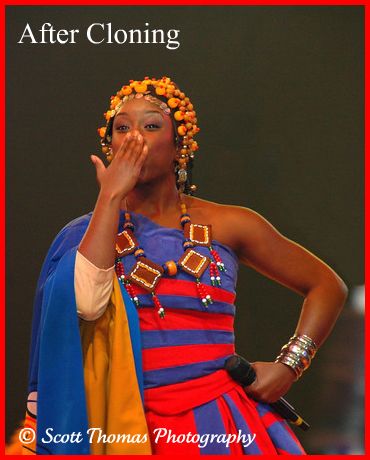
Festival of the Lion King Goodbye Kiss after cloning.









Trending Now
This closure is not unexpected.
There are new rules for Disney Loungefly collectors!
Disney World hotel experts have RULES. 👀 We asked our team what they absolutely refuse...
We finally have details on 'Star Wars Starfighter'!
One transportation option is currently closed at Disney's Yacht and Beach Club Resorts.
A new rollercoaster is coming to Silver Dollar City!
It was just confirmed that Bob Gurr worked on the new version of Carousel of...
BoxLunch recently released nine new Loungefly bags!
These pavilions could have changed EPCOT history forever.
A Six Flags Magic Mountain ride has been closed for over a month, and here...
Yes, we're telling you to rope drop Magic Kingdom.
Here is the full list of dates for 2026 Halloween Horror Nights at Universal Orlando!
Refurbishment has hit ANOTHER Disney World hotel and no, we're not kidding.
Disney World restaurant menus changed this week!
Huge Marvel movie news incoming!
Here is a list of EVERY attraction open during Mickey's Not-So-Scary Halloween Party.
We are begging you not to do these things at your next Disney World dining...
We've got new details about 'Frozen 3' coming out next year!
A heat advisory has been issued for Disney World.
Let's visit one of Disney World's most underrated hotel lounges.