

Just when we’ve learned everything we could about Genie+ in Disney World, Disney announces it’s changing the entire thing.

Genie+ will soon become Lightning Lane Multi Pass, while the Individual Lightning Lane option will become Lightning Lane Single Pass. Now the name changes make perfect sense and are way better at explaining what each is for. Other changes are also happening with Disney World’s version of the service, but we’re also hoping some updates are made to fix some existing Genie+ problems.
First, let’s talk about the big changes that will come with Lightning Lane Multi Pass and Lightning Lane Single Pass. Both services will finally allow Disney World visitors a way to book lightning lanes for rides BEFORE their trip: seven days ahead of time for Disney World hotel guests and three days for everyone else. You’ll also be able to purchase Lightning Lane Multi Pass and Lighting Lane Single Passes in one transaction.
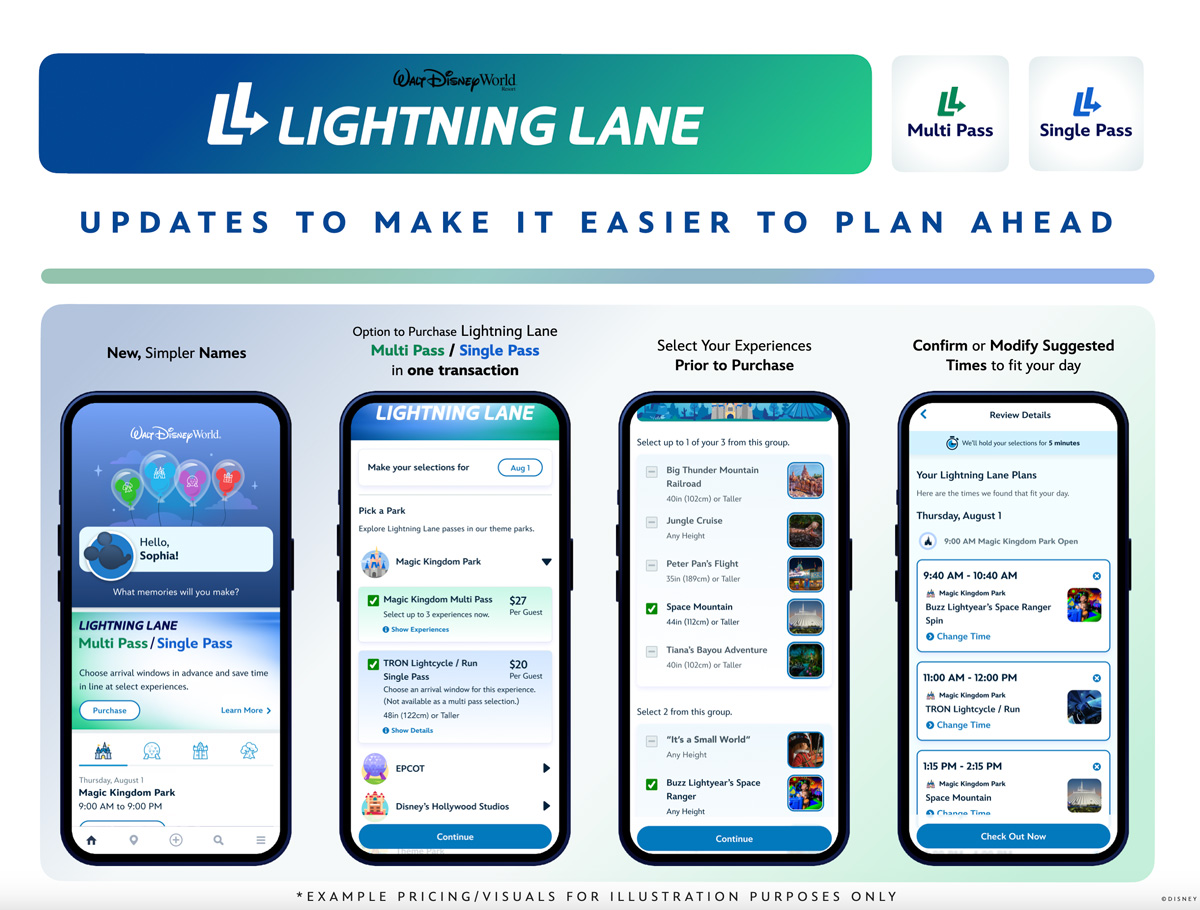
Lightning Lane Multi Pass Rides will be on a tiered system for these advance bookings, similar to the tiers used when Disney still had its free FastPass+ service. You’ll be able to choose one ride from the highest tier and two rides from the lowest tier or three rides from the lowest tier. (Note that this doesn’t apply to international visitors — if you’re coming from outside the country, you cannot make your selections until you’re in the U.S.)

But what about those problems that exist with Genie+ now? Is Disney going to fix those? Here are the issues we’d like to see addressed.
The Disappearing Lightning Lane
We can’t tell you how many times we’ve booked a Lightning Lane through Genie+ and get confirmation that the Lightning Lane is booked. Then we go to check it later, and it’s just gone.
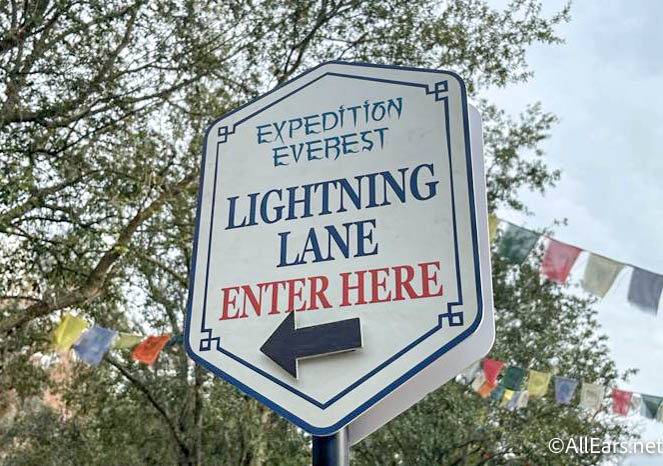
This is an obvious bug in the software, but it’s annoying when you’re planning to be at a ride at a certain time and then realize the Lightning Lane you thought you booked isn’t there.
The Time Switcharoo
We’ve also had a lot of instances where we’ll be booking a Lightning Lane through Genie+ and we select the time that works best for us, but then the app turns around and gives us a completely different time.

This could be because that original time slot has filled up, but there should be a way that time slots are held to give you time to make the selection you want and not the one the app decides to give you.
Not everyone is recognized in your party
It’s already a hassle to make sure that everyone in your party is grouped together and added, but sometimes Genie+ still doesn’t believe that those people all have valid tickets. So then you go to book the Lightning Lane, names are missing, and you’re wondering how.
If they’re already part of your group with valid tickets on the My Disney Experience app, shouldn’t Genie+ already know that everyone has a valid ticket? It’s a frustrating problem when traveling with friends and family.
Giving bad recommendations on what to ride next
So the free Genie part of the app is supposed to help you plan your day and use all the data it gets from Disney to recommend what you should do next based on your preferences and ride wait times. You can even go in and tell it what rides, restaurants, and entertainment are your priorities.

However, it almost always gives bad recommendations. We’ve almost always found the free Genie useless for planning.
Only allowing you to use it once for each ride
Currently, you are only allowed to use Genie+ once per ride, meaning that if you want to ride that attraction more than once, you’ll have to use the standby line the other times.
Now, we don’t expect this to change with Lightning Lane Multi Pass, so this is more wishful thinking than anything. But everyone should be able to ride their Disney World comfort ride as much as they want with a short wait.
A better user interface
Genie+ is currently part of the My Disney Experience app, and it is way more complicated to use than it should be. Currently, to book a Lightning Lane, you have to go to the Tip Board, choose which park, select “Show Only Lightning Lane Entrances” and then scroll down to the ride you want to book. That’s a LOT of unnecessary steps. Or you can search for an attraction, click on the “LL” icon and then still have to go to the Tip Board and scroll down for that attraction. That is NOT user-friendly in any way.
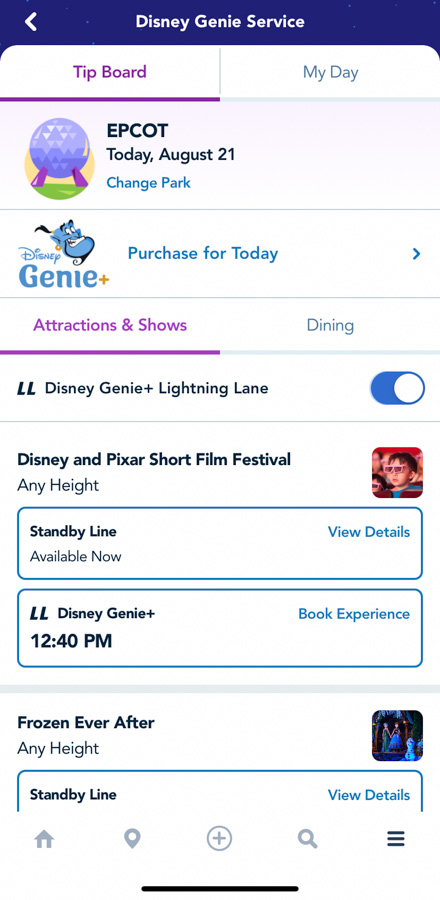
Why can’t there just be a button on the home page for those who have purchased Genie+ that goes directly to the park you’ve scanned into for the day with a list of rides? Each ride page should also have a link that goes directly to booking a Lightning Lane for that ride.
Refunds for Lightning Lane Single Pass
Currently, if you book an Individual Lightning Lane (which is when you pay for the Lightning Lane JUST for that ride), you have to request a refund directly from a Guest Relations counter or tent if the ride closes for the day after your return time.

The app should be able to automatically issue a refund because it actually knows when rides close and remain closed. Or, at the least, you should be able to click on a button on the ride page (which will say if it’s closed) to request a refund through the app. It shouldn’t require you having to chase down the refund.
So yes, we’re hoping that these issues get fixed with the NEW Lightning Lane Multi Pass and Lightning Lane Single Pass. We guess we’ll have to see how it works when the changes go into effect on July 24th.
3 Attractions That Are MISSING From the New Lightning Lane Multi Pass System at Disney World
Join the AllEars.net Newsletter to stay on top of ALL the breaking Disney News! You'll also get access to AllEars tips, reviews, trivia, and MORE! Click here to Subscribe!

Do you have any Genie+ problems you hope Lightning Lane Multi Pass fixes? Let us know in the comments!









Trending Now
We've compiled a list of some of the best items you should pack for your...
Looking for the right Disney World shoes? Amazon has nine Brooks pairs for you!
Is this Loungefly backpack actually worth your time and money in Disney World? We put...
Upgrade your Universal fit with these new Loungefly souvenirs!
These souvenirs are ideal for Disney Adults looking to upgrade their next vacation or bring...
These Disney Loungefly bags online have us OBSESSED!
New stores are headed to Disney Springs!
It’s about to get CHAOTIC at Disney World! May 26th is right around the corner,...
Disney fans are warning each other NOT to book Deluxe hotels, but not for the...
Let's talk about some of the downsides to staying at Disney's Port Orleans Hotel.
Jollywood Nights is coming back to Disney World in 2026!
If you're an introvert, you might want to avoid this Disney World ride!
If you’ve been trying to find a water bottle that survives rope drop through fireworks,...
There are two gift card deals available right now that can put real money back...
We've got an update about season 2 of 'Ashoka.'
We've got an update on a new snack spot coming to Disney's Hollywood Studios!
Two POPULAR Magic Kingdom attractions have finally reopened after lengthy refurbishments, and a LOT has...
Big news from Epic Universe -- Lug bags are officially on their way!
We went to a barbecue restaurant for noodles and we have zero regrets!
The best Disney kitchen merch just dropped online!