


Before I go on talking about organizing our digital library of photographs, I want to introduce you to the new breed of software that were released a couple of years ago I refer to as digital darkroom programs. These programs assist you in organizing, editing and outputting (either files or prints) your digital photos in one place. You no longer need more than one program to do each of these tasks.
The two programs I want to talk about are Adobe Lightroom 2 (PC and Mac) and Apple Aperture 2 (Mac only). Now, I know there’s a lot of discussion on which one to use in photography forums. I think both do a great job. If you have not looked at either of these programs, you can download free trials from Adobe and Apple.
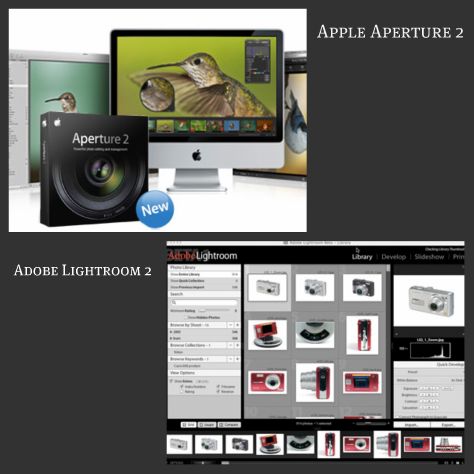
What these programs do is import your photos from your camera or memory cards and place them into one image database. If you’ve been following this series, you know I put my photos into specific folders on my computer system depending on the year and month they were taken. Both of these programs will allow you to keep such a system and give you the freedom to create projects or collections within their image database or library as I like to call it. I use Aperture 2 and as an example I want to show you how I use Aperture’s organizational power.
I set up a Project called Walt Disney World. Inside this project I have each of my trips in a folder labeled WDW_YYYYMM (so far I haven’t stayed over a two month span yet but I would still separate the photos on my hard drive into separate folders). My last trip from May, 2008 is in folder WDW_200805 and has a few thousand photos. I have some albums in the WDW project I have set up for various reasons. One is called POTW (for the Picture This! Picture of the Week theme) where I have past and upcoming photos for the themes Lisa, Barrie and I have come up with. An album consists of photos I have moved into it. The photos are not actually in the album or folders but point back to the photo’s location in the library. ONe photo can be in multiple projects, folders or albums. Luckily, I don’t have to worry about where the photos files are as Aperture takes care of all that for me. I just drag and drop.
I can also search for a group of photos and this is where metadata comes in very handy. Let’s say I want to create an album with just my photos of Epcot’s Spaceship Earth. Since I have added the keywords, spacehip earth, to all my photos I have taken of this attraction, I can pull up a view of all of those photos easily by typing it into the search box. Once I have that view, I can create an album with a simple click of my mouse. If I had not added keywords, it would have taken me a long time to look through each of my WDW folders and pick out all the Spaceship Earth ones.
If you are looking to easily organize, process and print your digital photographs and have not looked at either Aperture or Lightroom, I think you will be very surprised at how versatile these programs are. Both have come out with second versions in the last few months with vast improvements over their first editions.









Trending Now
Disney World has plenty of unwritten rules, and our team of professional Disney adults has...
These rides at Disney World almost have no wait.
Disney Springs is much easier to love when your social battery isn’t blinking red. These...
A new Haunted Mansion MagicBand+ has arrived in Disney World.
Head over to BoxLunch to find these new Halloween-themed Disney souvenirs!
There's no such thing as a Disney World expert. Or is there??
Disney has just signed a multiyear deal with Kraft Heinz that will introduce new dining...
Disney World can be stressful, but here are the biggest DOs and DO NOT DOs...
This mobile order update at Disney World is huge!
A new Halloween event is coming to Dollywood in 2026!
Trying to make it through a day at Disney World with wet shoes? That’s one...
Two Disney World fireworks showtimes are changing!
We tried the new sriracha popcorn in Disney Springs, and we are bringing you our...
Disney's Boardwalk Villas got a scathing review recently that could indicate some issues with a...
Disney's Coronado Springs is going to undergo a massive refurbishment!
You can't miss these freebies at Universal Nights at Epic Universe!
This Animal Kingdom experience is one step closer to fully opening!
You can now get feminine hygiene products for FREE in Disney World.